- Apr 21
LinkedIn Newsletter Analytics: The Metrics That Actually Drive Revenue
- Chelena Peart
If you have a LinkedIn newsletter and the only thing you ever check is your view count, you are sitting on a goldmine of business intelligence and ignoring it.
That is the trap most coaches, consultants, and expert-led business owners fall into. You publish an edition, glance at the number, feel pleased or disappointed, and move on. But LinkedIn newsletter analytics now give you far more than a vanity scoreboard. They tell you whether your newsletter is actually doing its job — attracting the right people, earning deeper attention, and strengthening your position as the go-to person in your space.
The question is no longer "How many people saw this?"
The better question is: "Is this newsletter building the kind of trust that turns into clients?"
That is the lens you need. And once you have it, everything about the way you use your dashboard changes.
Your Newsletter Is Not a Content Dashboard — It Is a Positioning Dashboard
This is the reframe that changes everything.
Most people treat their newsletter like a content checklist. Publish. Promote. Check views. Repeat. But if your business depends on trust, authority, and relationship-building, your newsletter plays a much bigger role than that.
It is your thinking, your expertise, your intellectual property — packaged as a gift that builds belief over time. That makes it an authority asset, not just another post format.
And that is exactly why LinkedIn newsletter analytics matter so much. They do not just tell you whether something "performed." They tell you whether your message is landing with the people you actually want in your world.
A large subscriber count means very little if the wrong people are joining. High impressions are not especially helpful if nobody is clicking through. Strong engagement can look exciting on the surface, but if it never translates into deeper interest, it is not commercially useful.
So when you open your LinkedIn newsletter analytics, stop looking for ego strokes and start looking for evidence.
The Three Layers of Your LinkedIn Newsletter Analytics
Your dashboard is not a single number to check. It is a story told in three layers, and each one reveals something different about how your newsletter is performing as a business tool.
Layer One: The Trend Story
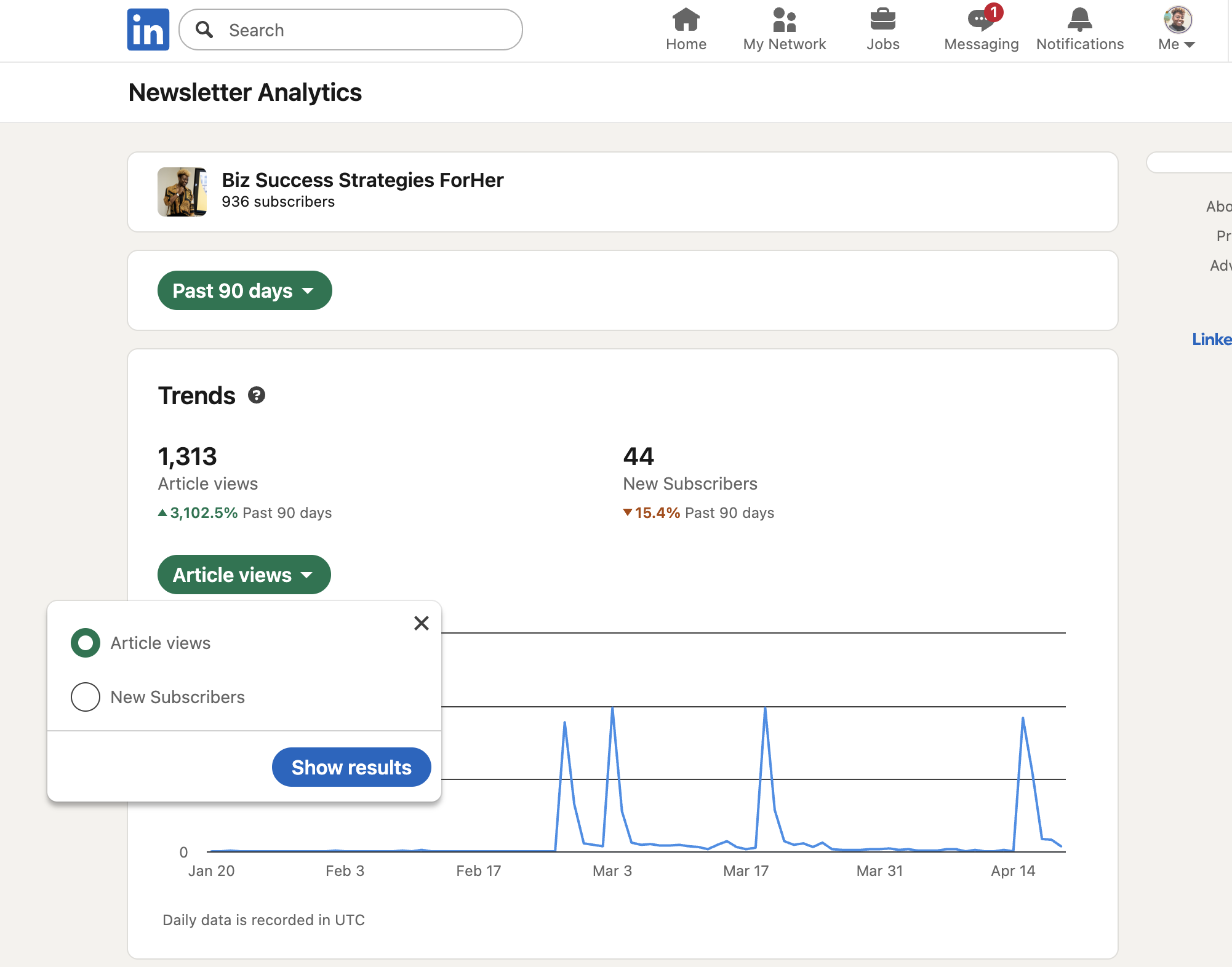
The Trends section lets you toggle between article views and new subscribers — and these tell two very different stories.
Article views show curiosity. Someone moved beyond passive scrolling and clicked to read. That matters. But subscribers show something stronger: intent. A subscriber is saying "I want more of this." They are opting into your thinking on an ongoing basis.
For most expert-led businesses, subscriber growth is the more commercially valuable signal. A newsletter that earns subscriptions is building ongoing permission and trust — and that is where long-term business value sits.
LinkedIn also shows percentage change compared with the previous period. This is where you spot momentum. Did a certain topic create a spike in new subscribers? Did a more specific or nuanced angle outperform the broader ones? You are not just asking whether something did well. You are looking for patterns — and that is where the real insight lives.
Layer Two: Depth Over Visibility
The Article Totals section shows impressions, engagement, and article views for each edition. The real value comes from reading these metrics together rather than in isolation.
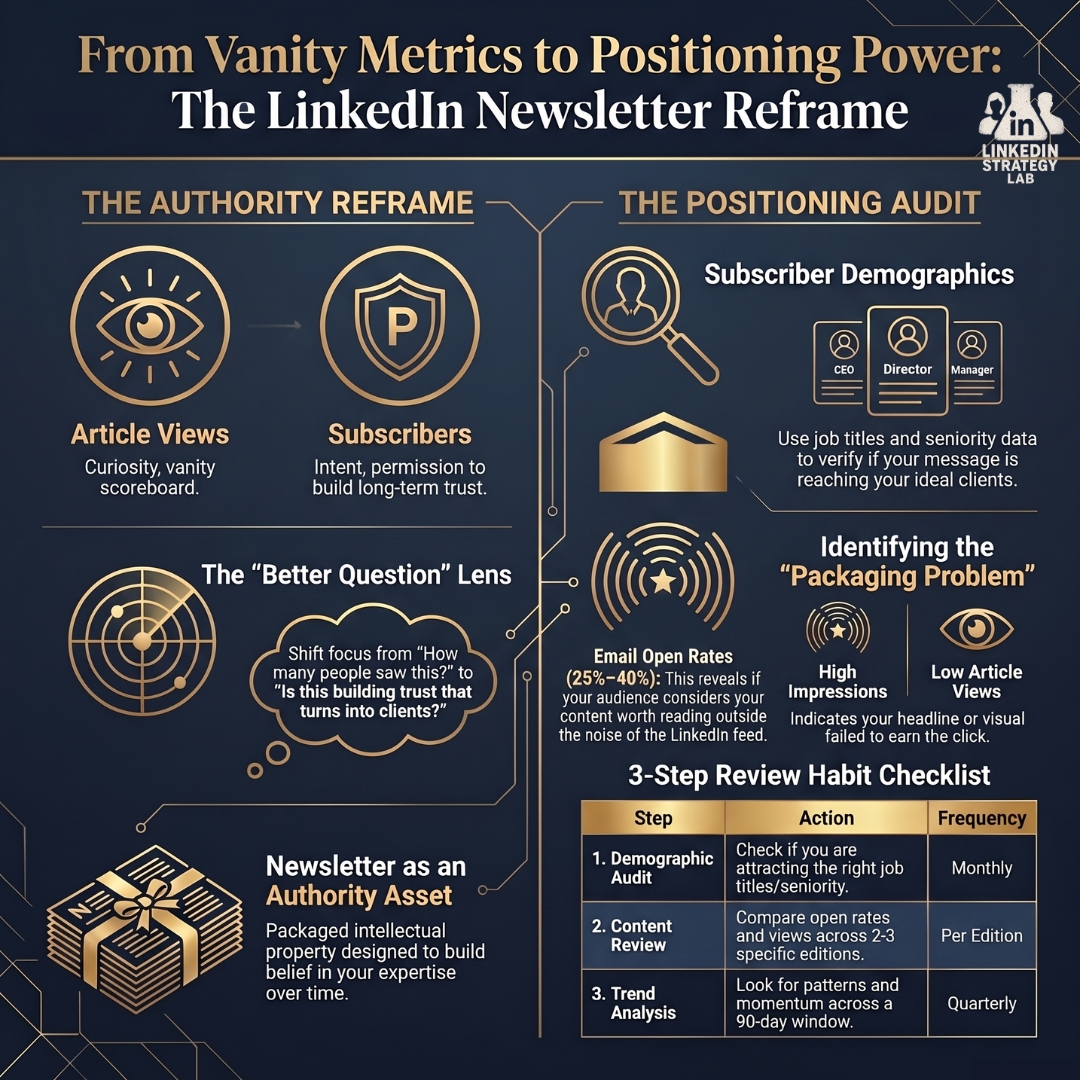
If you have high impressions but low article views, that is a packaging problem. People are seeing your newsletter but something in the headline, hook, or visual is not compelling enough to earn the click.
If you have solid article views but weak engagement, people are reading but the edition is not sparking conversation. That does not always mean the content is bad — but it is worth knowing.
The mistake most people make with LinkedIn newsletter analytics is treating each number like a separate scoreboard. But the numbers are telling a story. Your job is to read it.
Layer Three: Your Newsletter as an Email Asset
This is one of the most overlooked parts of LinkedIn newsletter analytics. When you click into a specific edition, you can now see email sends and email open rate — and this changes everything.
Your newsletter is not only being discovered in the feed. It is being delivered directly into inboxes. And inbox performance tells you something the feed metrics cannot: whether your audience considers your content worth opening even outside the noise of LinkedIn. As a benchmark, strong newsletters often see open rates somewhere between 25% and 40%, depending on the niche and how targeted the topic is
Sometimes a newsletter can look average from a public engagement standpoint yet perform brilliantly in inboxes. That means it may be doing stronger work as a direct trust-building asset than as a feed asset. And for a business that runs on relationships, that distinction matters enormously.
The Most Valuable Section: Subscriber Demographics
If you are an expert-led business owner, this may be the single most important area in all of your LinkedIn newsletter analytics.
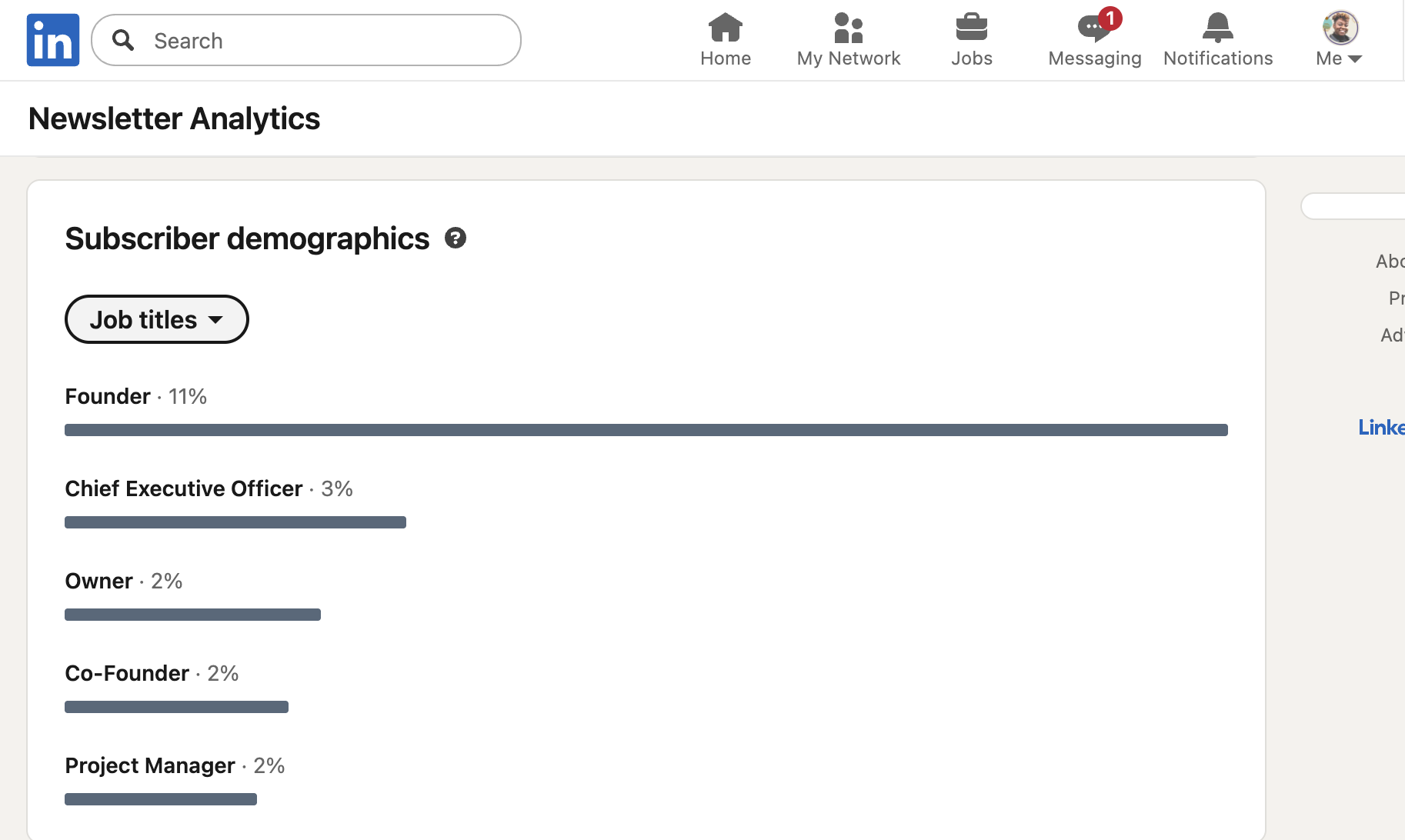
The Subscriber Demographics section shows you who is actually subscribing — job titles, companies, industries, locations. This is where your newsletter stops being a content tool and starts being a positioning dashboard.
Because now you are not just asking whether your newsletter is growing. You are asking whether it is attracting the right people.
If you want to work with senior decision-makers but your subscriber base is mostly mid-level professionals, that is not necessarily a failure — but it is a signal. It might mean your positioning is too broad, your topics are attracting the wrong level of buyer, or your angle is not aligned with the problems your ideal client actually cares about.
If you're still building out your broader LinkedIn presence alongside your newsletter, this guide to LinkedIn strategy for female entrepreneurs covers the foundations — from content pillars to profile optimisation.
This is why LinkedIn newsletter analytics function as a positioning audit. They show you whether your brand is clear, whether your thought leadership is specific enough, and whether your authority is being built in the right market.
And once you have that evidence, you stop guessing.
Your Subscriber List Is Relationship Intelligence
The final section shows your newest subscribers, with options to follow, connect, or message them.
That does not mean you should start pitching people the moment they subscribe. Please do not do that.
But it does mean you now have a warm pool of people who have actively said they want to hear more from you. That is a stronger signal than a casual like. These are people who have opted into your thinking.
So treat this list as relationship intelligence. Pay attention to who is joining. Notice recurring patterns. Nurture, do not pounce.
When used well, LinkedIn newsletter analytics can help you identify people who may eventually become leads, clients, collaborators, referral partners, or amplifiers of your message. Your newsletter is not just educating people. It is deepening trust.
The 4-Step Review Habit That Makes This Actionable
If you want a practical takeaway, build this into your calendar:
Check subscriber demographics first. Are these the people you actually want to attract?
Review two or three individual editions. Look at article views, email sends, and open rates to see which topics have stronger pull.
Compare trends over 90 days. A wider window shows actual patterns rather than one-week noise.
Schedule it. If the review is not in your calendar, it will not happen.
That last point matters more than people realise. Consistency is not just about publishing consistently. It is about reviewing consistently. Because if your audience does not look right, the answer is not always to publish more. Often, the answer is to become more strategic with your topics, your angle, and your positioning.
More content does not automatically fix weak strategy.
Why Strategy Matters More Than Your LinkedIn Newsletter Analytics
LinkedIn newsletter analytics will show you the gaps. But they will not close those gaps for you.
You can have access to every chart and metric and still produce a newsletter that feels vague, inconsistent, or disconnected from your business goals. The dashboard reveals what is happening. It cannot replace strategic thinking.
So if your newsletter is not pulling subscribers, not earning opens, or not attracting the right audience — pause and ask better questions. Is your positioning clear enough? Are your topics specific enough? Are you speaking to the problems your ideal client actually wants solved?
That is where the real work is.
Watch the full training: I walk through the entire LinkedIn newsletter analytics dashboard step by step — including what to look for, what to ignore, and how to build a review system — in this video.
FAQ
What is the most important metric in LinkedIn newsletter analytics?
For most expert-led businesses, new subscribers are one of the strongest signals because they show ongoing interest and permission to stay in touch. Article views matter too, but subscribers indicate deeper intent.
What does a high impression count but low article views mean?
It usually suggests a packaging problem. People are seeing your newsletter, but the headline, hook, or visual may not be strong enough to earn the click.
How should you use subscriber demographics in LinkedIn newsletter analytics?
Use them to check whether your newsletter is attracting the people you actually want to reach. Job title, industry, and seniority data help you assess whether your positioning is aligned with your ideal client.
What is a good email open rate for a LinkedIn newsletter?
A strong open rate typically falls between 25% and 40%, depending on your niche and how targeted the topic is.
How often should you review LinkedIn newsletter analytics?
Regularly. A 90-day window is more useful than checking only the last 7 days, and adding a recurring review to your calendar helps you spot patterns and make better strategic decisions.
Can LinkedIn newsletter analytics help you get clients?
Yes — but not by showing you who to pitch. They help you understand whether your content is attracting the right audience, building trust at the right level of seniority, and positioning you as the go-to expert. That strategic clarity is what ultimately drives enquiries and client conversations.
Chelena Peart is the founder of The LinkedIn Strategy Lab, a free community for entrepreneurs who want to get leads, clients, and opportunities from LinkedIn. If you want support turning your newsletter analytics into a clearer positioning strategy, that is exactly the kind of conversation happening inside the Lab.
Book your free discovery call here
FAQ section
Frequently asked questions
You've got questions. We've got answers.
How do profile views impact lead generation on LinkedIn?
Profile views indicate that people are interested in your profile, skills, or services. The more views you get, the higher your chances of attracting potential leads. Optimising your profile ensures that visitors immediately see the value you offer, encouraging them to connect or inquire about your services.
How can I increase my LinkedIn profile views?
To boost profile views:
Optimise your profile with relevant keywords.
Use a professional photo and headline that highlights your expertise.
Engage actively by commenting on posts, sharing insights, and participating in discussions.
Post valuable content consistently to attract more visibility.
Join relevant LinkedIn groups and network with industry peers.
Can LinkedIn Premium improve my lead generation results?
Yes, LinkedIn Premium gives access to:
Advanced Search Filters to find ideal prospects.
More Profile View Insights to see who’s viewing your profile and target them with follow-ups.
InMail Credits for reaching out to decision-makers directly.
Additional Analytics to monitor engagement and refine strategies.